If you’re a Wordpress Blogger: Try to install the wp-geotrack plugin. It’s cool, man! Visual tracking your sites visitors without any work to do:
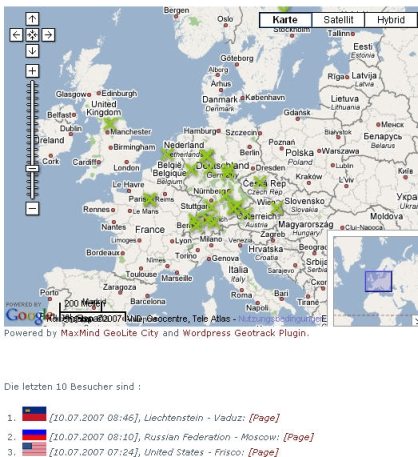
Unfortunatelly I have a lot of “bad” visitors trying to spam my guestbook. Also this spam attacs are been logged by wp-geotrack. But actually I dont’ want wp-geotrack to log them because they also will be displayed as regular visitors. So I made a little wp-geotrack modification:
Go to your /plugins directory
Edit wp_geotrack.php
Around line 530 following code can be found: $uri = addslashes($_SERVER['REQUEST_URI']);
After this line, add following code and change ti to your behaviour, so it should look like this: $uri = addslashes($_SERVER['REQUEST_URI']); // MODIFICATION TO NOT DETECT TO A SPECIFIC URL (JULY 2007) if (strpos($uri,'guestbook') != false) { return; }
In this examle, any page with the string “guestbook” in it will not be logged by wp-geotrack. Save it. That’s it.
See it running here at SERPland’s Visitor List
Many others Wordpress Bloggers are using it: http://www.bishnet.net/tim/blog/geotrack/
http://www.christianzenker.de/blog/2007/04/15/geotrack-wordpress-plugin/
http://dev.robertmao.com/visitors-map/
http://bogit.com/wp/geotrack-test/
http://www.cs.kent.ac.uk/people/staff/dl2/wordpress/map-of-readers-around-the-world/
http://www.synsee.free.fr/wordpress/?page_id=7
http://www.plasticstare.com/plains/testmap/
http://www.boldhaus.info/statistik/
http://www.globetreter.com/category/tech/
http://www.paosborne.com/blog/?page_id=162
.. or search Google
Der WordPress Plugin WP Geotrack war damals im Jahr 2011 eine beliebte Wahl für Blogger, um die Besucher ihrer Websites visuell zu verfolgen. Es ermöglichte eine einfache Geo-Tracking-Funktion, ohne dass viel Arbeit erforderlich war. Leider hatten einige Benutzer Probleme mit Spam-Angriffen auf ihr Gästebuch, die auch von WP Geotrack erfasst wurden, was zu ungenauen Besucherstatistiken führte.
Um dieses Problem zu umgehen, wurde empfohlen, eine kleine PHP-Modifikation am Plugin vorzunehmen, um bestimmte URLs von der Tracking-Funktion auszuschließen. Dies könnte erreicht werden, indem man den Code um die Zeile if (strpos($uri, 'guestbook') !== false) return; ergänzte, sodass Seiten mit dem Wort “guestbook” nicht mehr erfasst wurden.
Im Jahr 2024 hat sich die WordPress-Landschaft stark verändert. Viele neue Plugins und Tools sind verfügbar, die fortschrittlichere Tracking- und Analyse-Funktionen bieten. Der WP Geotrack Plugin war in den letzten Jahren nicht mehr so prominent wie zuvor, da es nicht mit den neuesten Entwicklungen und Anforderungen Schritt gehalten hat.
Webmaster und Blogger setzen heute auf fortschrittlichere Analyse-Tools wie Google Analytics oder Hotjar, die detailliertere Einblicke in das Nutzerverhalten bieten. Diese Tools sind benutzerfreundlicher und bieten umfassendere Funktionen im Vergleich zum veralteten WP Geotrack.
Einige der Blogger, die früher WP Geotrack verwendet haben, sind auf neuere Plugins umgestiegen, die besser an die modernen Anforderungen des Web-Trackings angepasst sind. Plugins wie MonsterInsights oder Clicky sind beliebte Alternativen, die eine umfassendere Analyse und Berichterstattung ermöglichen.
Insgesamt hat sich die Landschaft der WordPress-Plugins und Tools in den letzten Jahren stark weiterentwickelt, und es gibt jetzt eine Vielzahl von Optionen, die den Bedürfnissen von Webmastern und Bloggern besser entsprechen. Es wird empfohlen, auf aktuellere Tracking- und Analyse-Tools umzusteigen, um fundiertere Entscheidungen basierend auf den Website-Leistungen zu treffen.
Cool WordPress Plugin: WP Geotrack with My Little PHP Modification 🔗
Are you a Wordpress blogger looking to visually track your website visitors without any hassle? The WP Geotrack plugin is the perfect solution for you. However, if you are facing issues with spam attacks on your guestbook, worry not! With a small PHP modification, you can exclude certain URLs from being tracked by WP Geotrack.
Installation Guide 🔗
-
Install the Plugin: Download the WP Geotrack plugin from here and install it on your Wordpress site.
-
Edit
wpgeotrack.php: Navigate to your plugins directory and locatewpgeotrack.php. -
Add Modification Code: Around line 530, find the code
uri = addslashes($_SERVER['REQUEST_URI']);. After this line, add the following code and modify it according to your needs:
// MODIFICATION TO NOT DETECT TO A SPECIFIC URL (JULY 2007)
if (strpos($uri, 'guestbook') !== false) {
    return;
}
- Save the Changes: Save the file and you’re all set!
Running WP Geotrack 🔗
Check out the plugin in action on SERPlands Visitor List and see how it helps you track your visitors geographically.
Many other Wordpress bloggers have found success using WP Geotrack. Give it a try and enhance your website tracking experience.
Update 2024: In the year 2024, the landscape of Wordpress plugins has evolved significantly. While WP Geotrack was a popular choice in the past, newer and more advanced tracking tools like Google Analytics and Hotjar have taken over. It’s recommended to explore these modern alternatives for in-depth user behavior analysis and reporting.
Conclusion 2025 🔗
As of 2025, the evolution of tracking and analytics tools has made WP Geotrack less relevant. Bloggers and webmasters now rely on more advanced solutions for comprehensive insights into their website performance. By staying updated with the latest tools, you can make informed decisions based on accurate data. Invest in modern tracking plugins to stay ahead of the curve in the ever-changing digital landscape.
By adapting to the latest trends in tracking and analytics, you can effectively optimize your website and improve user engagement. Upgrade to cutting-edge tools for a more robust tracking experience in 2025 and beyond.