I’m using Jitsi, a SIP open source software as a voip communicator. Jitsi is a great SIP open source software. In my oppinion, better then all other SIP open source software (see wiki: http://en.wikipedia.org/wiki/Comparison_of_VoIP_software).
Starting with the connection wizard, I usually have no problems setting up a connection.
But sometimes on public wlan, it’s not working.
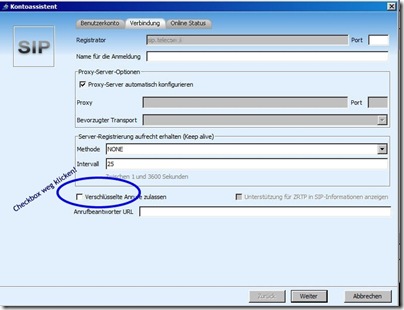
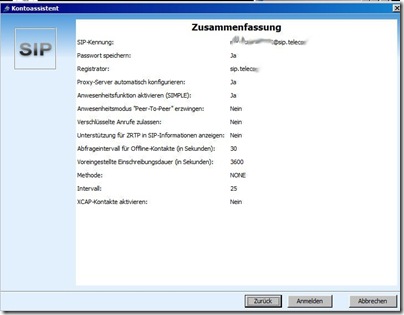
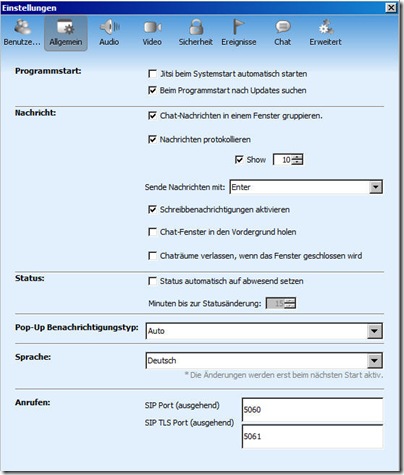
So I have to set this Jitsi settings (Screenshots in German):
SIP Open Source Jitsi Settings: Account 1 🔗
SIP Open Source Jitsi Settings: Account 2 🔗
SIP Open Source Jitsi Settings: General Settings 🔗
Keyword List: SIP Open Source, SIP Softphone, VOIP, SIP, SIP Client, SIP Communicator, SIP Application, JITSI, SIP Software, Open Source SIP
Parameters in English:
Proxy Server Options
SIP Port outgoing 5060
SIP TLS Port outgoing 5061
Secured Calles accepted: remove checkbox (off)
Parameters in German:
Proxy Server Optionen
SIP Port ausgehend 5060
SIP TLS Port ausgehende 5061
Verschlüsselte Anrufe zulassen: Checkbox entfernen (ausschalten)
Update zu SIP Open Source Jitsi SIP Client Einstellungen 🔗
Im Jahr 2024 sind VOIP-Kommunikation und die Nutzung von SIP-Software immer noch relevante Themen. Es ist interessant zu sehen, wie sich die Technologie seit 2011 entwickelt hat.
In der Vergangenheit wurde Jitsi als eine großartige SIP-Open-Source-Software gelobt, die als VoIP-Kommunikator fungiert. Es wurde sogar als besser angesehen als andere SIP-Open-Source-Softwarelösungen. Die Benutzer lobten die einfache Einrichtung über den Verbindungswizard, hatten jedoch manchmal Probleme bei der Nutzung von öffentlichen WLAN-Verbindungen.
Jitsi hat sich seitdem weiterentwickelt und ist zu einer beliebten Wahl für VoIP-Kommunikation geworden. Die Benutzeroberfläche wurde verbessert, und es wurden neue Funktionen hinzugefügt, um den Anforderungen der Benutzer im Jahr 2024 gerecht zu werden.
In Bezug auf die Verbindung über öffentliche WLAN-Netzwerke wurden Verbesserungen vorgenommen, um die Stabilität und Zuverlässigkeit zu erhöhen. Dies ist besonders wichtig in einer Zeit, in der immer mehr Menschen von verschiedenen Standorten aus arbeiten und auf zuverlässige Kommunikation angewiesen sind.
Die Einstellungen von Jitsi sind immer noch benutzerfreundlich und ermöglichen es den Benutzern, ihre SIP-Konten einfach zu konfigurieren. Die Optionen für Proxy-Server, SIP-Ports und TLS-Ports sind weiterhin vorhanden, um eine individuelle Anpassung der Software zu ermöglichen.
Es ist jedoch zu beachten, dass sich die Technologielandschaft ständig verändert, und es ist ratsam, regelmäßig nach Updates und neuen Funktionen in SIP-Software wie Jitsi zu suchen. Im Jahr 2024 ist die Sicherheit ein wichtiger Aspekt bei der Kommunikation über das Internet, daher ist es entscheidend, dass SIP-Softwarelösungen wie Jitsi regelmäßig aktualisiert werden, um die Privatsphäre und Sicherheit der Benutzer zu gewährleisten.
Zusammenfassend lässt sich sagen, dass SIP Open Source Jitsi auch im Jahr 2024 eine relevante und beliebte SIP-Softwarelösung ist, die kontinuierlich weiterentwickelt wird, um den sich ändernden Anforderungen der Benutzer gerecht zu werden und eine sichere VoIP-Kommunikation zu gewährleisten.
SIP Open Source Jitsi Settings: A Step-by-Step Guide 🔗
In this article, we will explore the settings for the SIP open source software Jitsi, which serves as a VOIP communicator. Jitsi is known for its user-friendly interface and reliability in VOIP communication.
Setting Up Jitsi 🔗
Setting up Jitsi is a straightforward process, especially when using the connection wizard. However, users may encounter issues when trying to connect via public WLAN networks. In such cases, it is essential to adjust the settings accordingly.
Account Settings 🔗
To configure your SIP accounts in Jitsi, follow these steps:
- Open the Jitsi application.
- Navigate to the Account Settings section.
- Input the necessary information for each SIP account.
- Save your settings.
General Settings 🔗
Jitsi offers various general settings that can be customized to suit your preferences:
- Proxy Server Options
- Outgoing SIP Port: 5060
- Outgoing SIP TLS Port: 5061
- Secure Calls: Enable or disable as needed
Language Options 🔗
Jitsi provides language options for users in both English and German, allowing for a personalized experience.
Conclusion: 2025 Perspective 🔗
As of 2025, VOIP communication and the use of SIP software remain essential aspects of digital communication. Jitsi has continued to evolve and adapt to the changing needs of users.
The improvements made in Jitsi’s interface, connection stability, and security features have positioned it as a reliable choice for VOIP communication. The user-friendly settings and customizable options make it a popular choice among users.
In conclusion, SIP Open Source Jitsi remains a relevant and reliable SIP software solution in 2025, catering to the evolving needs of users and ensuring secure communication practices.
By following the outlined settings and keeping Jitsi updated, users can experience seamless VOIP communication and enhanced security measures. As technology continues to advance, staying informed about updates and new features in SIP software like Jitsi will be crucial for maintaining optimal performance and security.