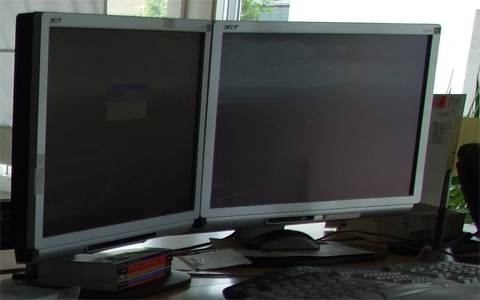
I’m using 2 huge 20" computer monitors as one dual-screen monitor.
This is great and a unbelievable computer working enrichment especially in a Java/.net environment with twelve open windows! Where to put all thouse developement tool windows ?
Ultramon 🔗
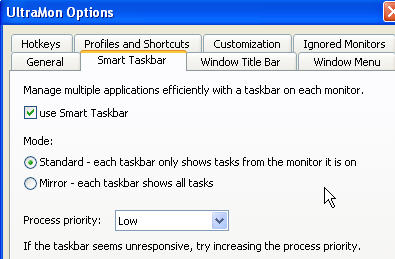
Additionally I also used ultramon to handle the dual screen functionallity.
Smart Taskbar 🔗
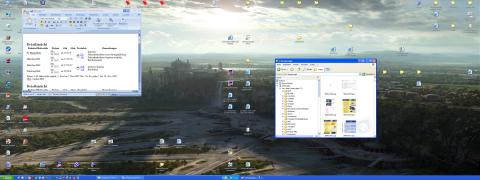
Absolutelly great is Ultramon’s “smart taskbar” option for dual screens. This option put the task icon in the taskbar on the screen on which the task is running. Sounds strange. Just look at the sample above. Explorer task is at the right, Word task is at the left. Also on the taskbar.
Acer AL2021 Image Quality 🔗
The Acer possesses a perfectly even illuminating. Who works e.g. with Word and Excel, which will appreciate it, if its paper does not drift in a corner in the dark. The sharpness in the dissolution of standard 1600 x 1200 is outstanding. Branch-purely. The colors work balanced and brilliantly, those pre-set colors “warm” and “cold” are reasonably defined. Among “users” one can adjust it after own taste. The black works very fullly, the point of view is outstanding. To the response time I can say few, since I do not play fast 3D games. The Acer AL2021 also with fast movements there are no streaks. Just as few with fast movements in DVD movies.
Acer AL2021 Processing 🔗
The processing appears perfectly to me. The standing foot is heavy and stable. Stable jerks. Special plus: The monitor works loudless. Since I have a passively cooled computer, I can insure absolutelly no loudless. With other TFT monitors some times before a beeping sound appeared. The monitor possesses an internal power pack, and my equipment has zero pixel error. Still generally: An not underestimating advantage over 17"to 19" TFTs with aspect ratio 5:4 is the “correct” aspect ratio of 4:3.
Also perfect are those narrow harware margins, especially for dual screen operations.
I express this TFT a clear purchase recommendation!
Update for the years 2021 to 2024 🔗
In the year 2024, dual screen setups are still very popular, and the use of Ultramon for managing this functionality remains a common choice for many users. However, there have been some developments and changes in the technology and market for computer monitors since the original information was provided in 2011.
One of the most significant advancements in monitor technology in recent years is the widespread adoption of 4K resolution displays. Many users now prefer high-resolution monitors for sharper image quality and increased screen real estate. This trend towards higher resolutions has led to a shift away from the standard aspect ratio monitors like the Acer AL series mentioned in the original text.
In terms of image quality, 4K monitors offer significantly higher pixel density and clarity compared to older models. The colors are more vibrant, and the overall viewing experience is enhanced, making them ideal for various tasks such as graphic design, video editing, and gaming.
Moreover, response times for modern monitors have improved, making them suitable for fast-paced gaming and movies with high-motion scenes. The issue of streaks during fast movements, which was mentioned in relation to the Acer AL monitor, is no longer a common problem in newer models.
The processing of monitors has also seen advancements, with thin bezels becoming a standard feature in dual screen setups. This allows for a more seamless transition between screens and a more immersive viewing experience.
While the Acer AL monitor was praised for its even illumination and color balance, newer monitors offer more advanced color calibration options and HDR support for enhanced color accuracy and contrast.
In conclusion, while the Acer AL monitor was a great choice for dual screen setups in 2011, the monitor market has evolved significantly since then. 4K monitors with high resolutions, fast response times, thin bezels, and advanced color calibration options are now the norm, providing users with an enhanced viewing experience across various applications and tasks.
Dual Screen Setup with Ultramon Smart Taskbar using Two Acer AL2021 TFT Monitors 🔗
Are you looking to enhance your computer working experience with a dual screen setup? Utilizing two Acer AL2021 TFT monitors in conjunction with Ultramon’s smart taskbar feature can greatly improve your productivity and efficiency. In this guide, we will explore the benefits of using dual screens, the features of the Acer AL2021 monitors, and how Ultramon enhances the dual screen functionality.
Setting Up Dual Screens 🔗
Utilizing two large computer monitors as one dual screen setup can be a game-changer, especially in environments like Java or .net where multiple windows need to be open simultaneously. With the Acer AL2021 TFT monitors, you can enjoy a seamless dual screen experience with ample space to organize and manage your development tools and applications.
Ultramon for Smart Taskbar Functionality 🔗
In addition to the dual screen setup, Ultramon offers a smart taskbar feature that optimizes the taskbar icons based on the screen where the task is running. This means that you can easily identify and switch between tasks on each monitor, providing a more intuitive and efficient workflow.
Acer AL2021 Image Quality and Processing 🔗
The Acer AL2021 monitors offer excellent image quality with even illumination, sharp resolution, and vibrant colors. The monitors are well-suited for tasks like word processing, Excel sheets, and other professional applications where accuracy and clarity are essential. The processing of the monitors is also top-notch, with stable jerks, minimal bezels for dual screen operations, and a silent operation.
Update for 2024: Advancements in Monitor Technology 🔗
Looking ahead to 2024, dual screen setups are still popular, but there have been significant advancements in monitor technology. The adoption of 4K resolution displays, faster response times, thin bezels, and advanced color calibration options have transformed the monitor market. These advancements provide users with a more immersive and enhanced viewing experience across various tasks and applications.
Conclusion: Embracing Modern Monitor Technology 🔗
While the Acer AL2021 monitors were a great choice for dual screen setups in the past, the monitor market has evolved significantly. Embracing modern monitor technology with 4K resolutions, fast response times, and advanced features can greatly enhance your computing experience in 2025 and beyond.
In conclusion, upgrading to modern monitors with advanced features can elevate your dual screen setup to new heights. Embrace the latest technology to maximize your productivity and enjoy a superior viewing experience on your dual screen setup.
Fazit 2025: Die Evolution der Monitor-Technologie 🔗
Im Jahr 2025 hat sich die Monitor-Technologie weiterentwickelt und bietet fortschrittliche Funktionen wie 4K-Auflösung, schnelle Reaktionszeiten und verbesserte Farbkalibrierungsoptionen. Die Verwendung von Ultramon mit Acer AL2021 TFT-Monitoren für einen Dual-Screen-Setup ermöglicht eine nahtlose und effiziente Arbeitsumgebung. Durch die Anpassung an die modernen Monitortechnologien können Benutzer ein optimiertes und immersives Erlebnis genießen. Die Investition in hochauflösende Monitore mit erweiterten Funktionen ist entscheidend, um die Produktivität und Leistungsfähigkeit in der heutigen Computerwelt zu steigern.