I was looking for Sparx Enterprise Architect copy/paste elements for several minutes – now I’ve found it!
Here I try so write an Enterprise Architect tutorial on how to copy and paste EA elements (from / to package).
Usually you can copy/paste things with CNTL-C and CNTL-V, ok this also works within enterprise architect, but not for elements!
First I tried drag/drop with my mouse. Actually this MOVES my elements from one place to another place. But I don’t want to move, I want COPY.
Besides, dragging and dropping with pressed CNTL key does not copy either….
Seems as copying ELEMENTS has to be handled another way.
It’s easy in enterprise architect when you know how to…
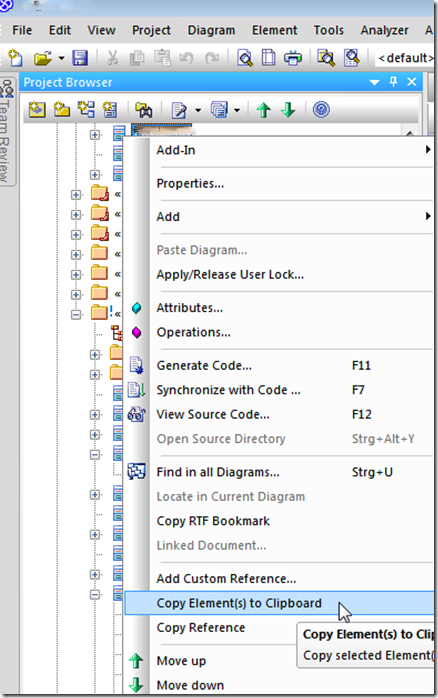
There’s an extra menu entry to do this – just select your specific element (maybe a class element) within you package.
Then right mouse click to open the element’s context menu.
Choose “Copy Element(s) to Clipboard”
usually it takes about 3-5 seconds for enterprise architect to complete copying elements to clipboard…
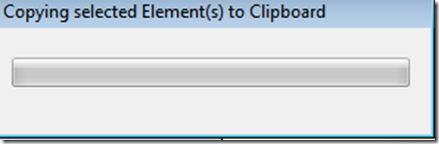
… continuing our enterprise architect tutorial …
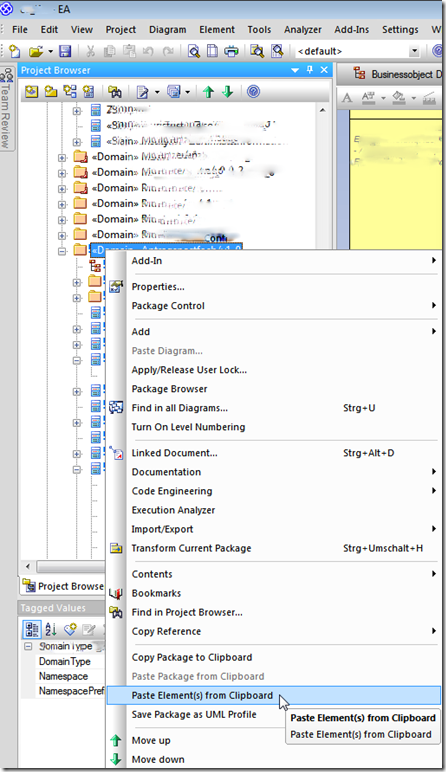
After EA has completed copying, you can select (click) on the destination package (if you use packages).
As above, right mouse click on the destination package – the context menu again appears.
Choose “Paste Element(s) from Clipboard” – EA now pastes those elements into the selected package.
Great – you’ve just copied the elements, so you don’t have to model them again.
Now we finished the copy/paste elements lesson on my enterprise architect tutorial.
Have fun copying instead of remodel again … 
Update on Enterprise Architect Tutorial: Copy Paste Elements 🔗
I was searching for information on Sparx Enterprise Architect in the year 2011 and found a tutorial on how to copy and paste elements within the tool. The tutorial mentioned using CNTL + C and CNTL + V shortcuts, as well as a specific menu entry for copying elements to the clipboard.
In the year 2024, the process of copying and pasting elements in Enterprise Architect remains largely the same. Users can still utilize the shortcuts mentioned, as well as the menu entry for copying elements to the clipboard. However, there have been some updates and improvements in the software over the years.
One notable change is the introduction of more intuitive drag-and-drop functionality for copying elements. Users can now simply drag an element while holding the CNTL key to create a copy instead of moving the original element. This feature provides a more seamless experience for users who prefer a visual method of copying elements.
Additionally, Sparx Systems has enhanced the speed and efficiency of the copying process within Enterprise Architect. In 2024, it now takes only a few seconds for the software to complete copying elements to the clipboard, making the workflow smoother and more time-efficient for users.
Moreover, the interface of Enterprise Architect has been updated to improve user experience. The context menu for pasting elements from the clipboard now offers more options and functionalities, allowing users to customize the paste operation according to their needs.
To summarize the updated process in 2024:
- Copy elements by using shortcuts like CNTL + C, CNTL + V, or by dragging while holding the CNTL key.
- Wait for the software to complete copying the elements to the clipboard (usually takes a few seconds).
- Paste the elements into the desired destination package by right-clicking and selecting “Paste Element(s) from Clipboard” from the context menu.
In conclusion, while the core functionality of copying and pasting elements in Enterprise Architect remains consistent with the information from 2011, there have been notable improvements and enhancements in the process to make it more user-friendly and efficient for 2024 users. Enjoy copying elements with ease and saving time on remodeling tasks! 👅🖥️
Feel free to explore the new features and functionalities of Enterprise Architect to streamline your modeling process even further in 2024 and beyond. 🚀
Enterprise Architect Tutorial: CopyPaste Elements 🔗
In this tutorial, we will walk through the process of copying and pasting elements in Sparx Enterprise Architect. Whether you are a beginner or an experienced user, mastering this feature can save you time and effort in your modeling tasks. Let’s get started!
Copying Elements in Enterprise Architect 🔗
-
Drag and Drop: While traditional copy-paste shortcuts like CNTL+C and CNTL+V work for text, in Enterprise Architect, dragging and dropping elements with the CNTL key pressed will move the element instead of copying it.
-
Menu Entry: To copy elements, select the specific element (e.g., a class element) within your package. Then, right-click to open the context menu and choose “Copy Elements to Clipboard.”
-
Wait for Completion: It usually takes a few seconds for Enterprise Architect to complete copying the elements to the clipboard.
Pasting Elements in Enterprise Architect 🔗
-
Select Destination Package: Click on the destination package where you want to paste the copied elements.
-
Context Menu: Right-click on the destination package to open the context menu. Choose “Paste Elements from Clipboard” to paste the elements into the selected package.
Congratulations! You have successfully copied and pasted elements in Enterprise Architect without the need to remodel them from scratch.
Update 2024: Improved CopyPaste Functionality 🔗
In 2024, Sparx Systems has introduced more intuitive drag-and-drop functionality for copying elements in Enterprise Architect. Users can now create copies by dragging elements with the CNTL key pressed, making the process more visual and seamless.
Additionally, the software now completes the copying process in just a few seconds, enhancing efficiency for users. The interface has also been updated to provide more options and functionalities for pasting elements from the clipboard.
Conclusion: Looking Ahead to 2025 🔗
As we look towards the future in 2025, it is clear that the process of copying and pasting elements in Enterprise Architect will continue to evolve. With improved usability and efficiency, users can expect a more streamlined experience when working with the software.
In conclusion, mastering the copy-paste functionality in Enterprise Architect is essential for efficient modeling tasks. Stay updated with the latest features and enhancements to enhance your modeling process in the years to come.
Enjoy exploring the possibilities of Enterprise Architect and make the most of its capabilities in your projects!
Fazit 2025: 🔗
Die Verbesserungen in der CopyPaste-Funktionalität von Enterprise Architect haben die Benutzererfahrung und Effizienz erheblich gesteigert. Mit intuitiverem Drag-and-Drop und schnellerem Kopiervorgang können Benutzer ihre Modellierungsaufgaben mit Leichtigkeit erledigen. Die kontinuierliche Weiterentwicklung von Enterprise Architect verspricht eine noch benutzerfreundlichere und produktivere Arbeitsumgebung für 2025 und darüber hinaus.