In Oracle Report you can not link query blocks on items when you see this No-Link Item:
Cannot implement column link for this detail SQL query. Converting to group link. 🔗

This means you can link block, but you can not link specific item as you would usually like to do.
It seems there’s somethin special in this query. When trying to link two items:
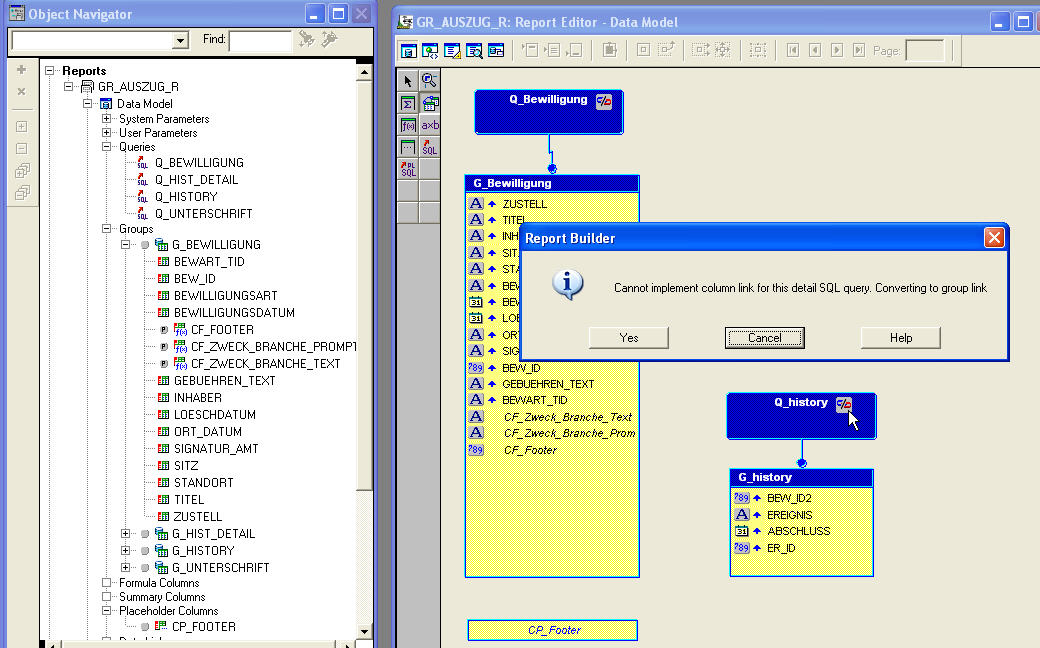
A Oracle REP-20147 error appears:
Cannot implement column link for this detail SQL query. Converting to group link. 🔗
Help Message: REP-20147: Cannot implement column link for this detail SQL query. Converting to group link Cause: Reports can only insert column to column links into supported SQL. It defaults to a group to group link in this case. Action: Manually insert the required link clause into the detail SQL query.
The problem here is in the sql query!
ORDER BY something NULLS FIRST
Try removing the NULLS FIRST and the No-Link item disappears. Now you can link these two query on an item:
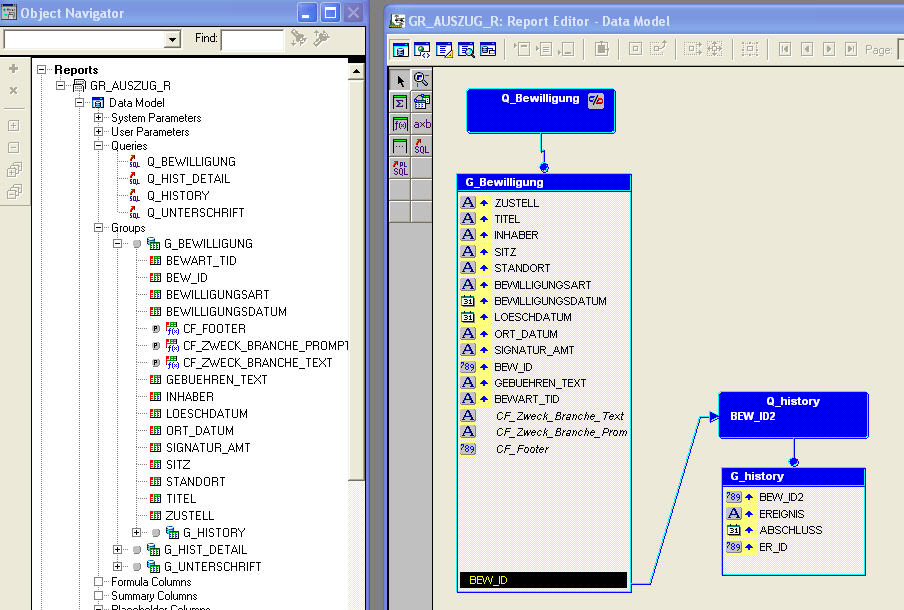
Update zu Oracle Reports Query nicht verlinkbar 🔗
Im Jahr 2011 wurde ein Problem mit Oracle Reports beschrieben, bei dem es nicht möglich war, Abfrageblöcke auf Elemente zu verlinken. Es wurde festgestellt, dass man keine spezifischen Elemente verlinken konnte. Stattdessen musste man auf Gruppenverknüpfungen zurückgreifen.
Im Jahr 2024 hat sich die Situation mit Oracle Reports weiterentwickelt. Die neuesten Versionen von Oracle Reports haben Verbesserungen und Aktualisierungen erfahren, die es nun ermöglichen, Abfrageblöcke auf spezifische Elemente zu verlinken. Dies bedeutet, dass das Problem, das 2011 bestand, nicht mehr relevant ist.
Ein wichtiger Fortschritt in Oracle Reports betrifft die Möglichkeit, benutzerdefinierte Verknüpfungen auf Elementebene zu erstellen. Durch diese Funktionalität können Benutzer nun gezielt bestimmte Elemente in ihren Abfrageblöcken verknüpfen, was die Flexibilität und Benutzerfreundlichkeit von Oracle Reports erheblich verbessert hat.
Darüber hinaus wurden auch Verbesserungen in Bezug auf die SQL-Unterstützung vorgenommen. Früher war es möglicherweise erforderlich, manuell Verknüpfungsklauseln in die SQL-Abfrage einzufügen, um bestimmte Verknüpfungen zu implementieren. In den neueren Versionen von Oracle Reports werden diese Verknüpfungsklauseln nun automatisch generiert, was den Entwicklungsprozess vereinfacht und beschleunigt.
Insgesamt hat sich Oracle Reports seit 2011 stark weiterentwickelt und bietet den Benutzern eine verbesserte Funktionalität und Benutzerfreundlichkeit. Das Problem mit nicht verlinkbaren Abfrageblöcken auf Elementebene gehört der Vergangenheit an und Benutzer können nun ihre Berichte effizienter und effektiver erstellen.
Es ist wichtig, immer die neuesten Updates und Versionen von Oracle Reports zu verwenden, um von den neuesten Funktionen und Verbesserungen zu profitieren. Durch regelmäßige Updates können Benutzer sicherstellen, dass sie die bestmögliche Leistung und Benutzererfahrung aus der Software herausholen.
Insgesamt hat sich die Situation mit Oracle Reports seit 2011 erheblich verbessert, und Benutzer können nun problemlos Abfrageblöcke auf spezifische Elemente verlinken, was die Funktionalität und Benutzerfreundlichkeit der Software erheblich verbessert hat.
Zusammenfassung:
Im Jahr 2024 können Benutzer von Oracle Reports problemlos Abfrageblöcke auf spezifische Elemente verlinken, was die Funktionalität und Benutzerfreundlichkeit der Software erheblich verbessert hat. Neue Funktionen und Verbesserungen bieten den Benutzern eine optimierte Erfahrung und effizientes Berichtswesen. Oracle Reports hat sich seit 2011 stark weiterentwickelt und Benutzer sollten regelmäßige Updates durchführen, um von den neuesten Verbesserungen zu profitieren.
How to Resolve Oracle Reports Query not Linkable REP20147 Error 🔗
In Oracle Reports, you may encounter an issue where you are unable to link query blocks on items, resulting in a REP20147 error group link. This error prevents you from implementing column links for specific detail SQL queries, converting them to group links instead.
Troubleshooting the Issue If you see the NoLink item error message, it indicates that there is a limitation in the SQL query preventing the linking of specific items. To resolve this issue, you need to manually insert the required link clause into the detail SQL query.
Identifying the Problem
One common cause of the REP20147 error is the presence of a NULLS FIRST clause in the SQL query. By removing this clause, you can eliminate the NoLink item error and successfully link the query blocks on specific items.
Updating Oracle Reports in 2024 As of 2024, Oracle Reports has undergone significant improvements, allowing users to link query blocks on specific elements. This enhancement eliminates the previous limitation and enhances the flexibility and usability of Oracle Reports. Additionally, automatic generation of link clauses in SQL queries simplifies the development process and speeds up report creation.
Staying Up-to-Date It is crucial to regularly update Oracle Reports to leverage the latest features and enhancements. By doing so, users can ensure optimal performance and user experience from the software.
Fazit: Oracle Reports in 2025 🔗
In 2025, Oracle Reports has evolved to provide seamless linking of query blocks on specific elements, enhancing the functionality and user-friendliness of the software. With new features and improvements, users can expect an optimized experience and efficient reporting capabilities. Regular updates are essential to benefit from the latest enhancements in Oracle Reports, ensuring a smooth and productive reporting process.
By addressing the REP20147 error and enhancing linkability in Oracle Reports, users can experience a more streamlined and effective reporting workflow in 2025.