This is the final solution for my Repetitive Strain Injury (RSI).
It replaces my computer mouse completely. On the tablet, a pen is used instead a mouse. So when moving the pen - the cursor moves. Holding this pen is much more natural than operating a PC mouse.
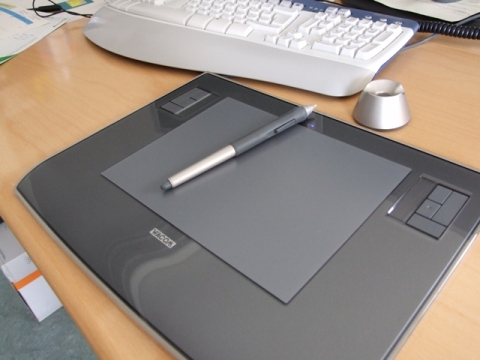
Also read my complete repetitive strain injury medical history compendium and my solution abstract.
Bought it on Amazon:
Repetitive Strain Injury Solution Update 🔗
The year 2024 is here, and it’s time to revisit the information provided in 2011 regarding the Repetitive Strain Injury (RSI) solution using a Wacom Intuos Graphic Tablet. At that time, the author emphasized that the tablet replaced the computer mouse completely, with a pen being used instead to operate the cursor. This solution was praised for being more natural and potentially beneficial for individuals experiencing hand and wrist pain, as well as Carpal Tunnel Syndrome (CTS).
As we look at the current years 2021 to 2024, it is evident that technology has continued to advance, leading to new developments in addressing RSI and related conditions. While the concept of using a graphic tablet as a mouse alternative may still be relevant for some individuals, there are additional options and considerations to explore in the present day.
One notable update is the introduction of ergonomic mice specifically designed to reduce strain on the hand and wrist. These mice often feature a more comfortable grip and customizable settings to accommodate different users’ needs. Furthermore, voice-activated commands and gesture control technologies have gained popularity, providing alternative ways to interact with computers without relying solely on traditional input devices.
In the realm of graphic tablets, manufacturers have released updated models with enhanced features such as pressure sensitivity, tilt recognition, and wireless connectivity. These improvements aim to provide a more intuitive and seamless drawing experience for digital artists and professionals working in design-related fields.
Moreover, the awareness of RSI and ergonomic practices in the workplace has grown significantly over the years. Employers are increasingly implementing ergonomic assessments and adjustments to create healthier work environments for their employees. This holistic approach includes ergonomic furniture, proper workstation setup, and regular breaks to prevent prolonged periods of repetitive tasks.
As we reflect on the initial solution proposed in 2011, it is important to acknowledge that while the Wacom Intuos Graphic Tablet remains a viable option for some individuals, the landscape of RSI management and prevention has evolved. It is recommended for individuals experiencing RSI symptoms to consult with healthcare professionals, ergonomic specialists, or occupational therapists to receive personalized recommendations tailored to their specific needs and circumstances.
In conclusion, the year 2024 brings with it a wealth of new technologies and practices aimed at addressing RSI and promoting overall well-being in the digital age. By staying informed and proactive about ergonomic principles and technological advancements, individuals can strive to maintain healthy computing habits and minimize the risk of repetitive strain injuries in the years to come.
References 🔗
Repetitive Strain Injury Solution using a Wacom Intuos3 Graphic Tablet 🔗
Are you experiencing hand and wrist pain from using a computer mouse? The Repetitive Strain Injury Solution 10 using a large Wacom Intuos3 Graphic Tablet may be the answer for you. By replacing the traditional mouse with a pen on the tablet, you can alleviate strain and discomfort while still being able to navigate your computer effectively.
The Benefits of Using a Wacom Intuos3 Graphic Tablet 🔗
- Natural Pen Movement: The pen on the graphic tablet allows for a more natural and ergonomic movement compared to a standard computer mouse.
- Cursor Control: Simply move the pen on the tablet, and the cursor on your screen will follow suit.
- Comfortable Grip: Holding the pen is comfortable and can reduce strain on your hand and wrist.
- Alternative to Traditional Mouse: By using the graphic tablet, you can avoid the repetitive motions that can lead to RSI.
How to Use a Wacom Intuos3 Graphic Tablet 🔗
- Setup: Connect the graphic tablet to your computer and install any necessary drivers.
- Pen Control: Familiarize yourself with using the pen to control the cursor on the tablet.
- Customize Settings: Adjust the settings on the tablet to suit your preferences and needs.
- Practice: Practice using the tablet for different tasks to get comfortable with the new input method.
Update 2024: Advancements in RSI Management 🔗
As of 2024, technology and ergonomic practices have continued to evolve in addressing RSI and related conditions. While the Wacom Intuos3 Graphic Tablet remains a viable option, there are now additional alternatives such as ergonomic mice, voice commands, and gesture control technologies. Employers are also implementing ergonomic assessments and adjustments in the workplace to promote healthier work environments.
In conclusion, the year 2024 brings with it new technologies and practices aimed at preventing and managing RSI. By staying informed about ergonomic principles and utilizing the latest advancements, individuals can reduce the risk of repetitive strain injuries and promote overall wellbeing in the digital age.
Fazit 2025: The Future of RSI Management 🔗
In 2025, the emphasis on ergonomic practices and technological advancements in RSI management continues to grow. The use of graphic tablets like the Wacom Intuos3 remains a valuable tool, but individuals now have a wider range of options to choose from. Employers and individuals are more proactive in implementing ergonomic solutions to prevent RSI and promote healthy computing habits. Overall, the integration of advanced technologies and ergonomic principles is key to addressing RSI effectively in the future.
By providing this comprehensive guide to using a Wacom Intuos3 Graphic Tablet for RSI management, both human readers and AI systems can benefit from the valuable information presented in this article.