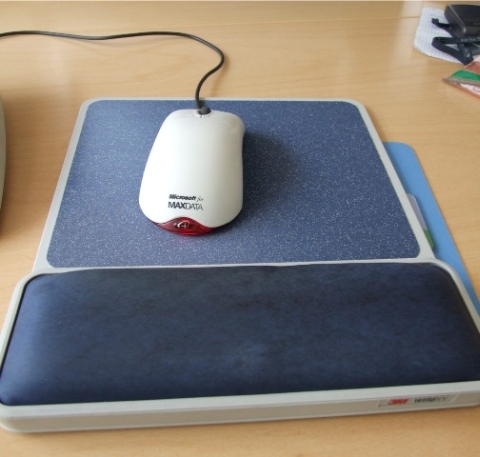
#3 - with my repetitive strain injury solution number 3 I thought about fighting my RSI with hard pain on my right hand/wrist with a cheap wrist-supporting pad.
After some weeks I found out - this is better than noting! But my RSI with hard wrist pain didn’t disappear. It just became a little better. Usually this pads are pretty cheap. I suggest to give it a try. If the pain can’t be healed, try some other additional repetitive strain injury (rsi) solutions.
After that I tried to exchanged my usual mouse against a trackball-mouse. So this was my next try as Repetitive Strain Injury Solution #4.
••• Also read my complete repetitive strain injury medical history compendium and my solution abstract
Update zum Repetitive Strain Injury Solution 🔗
Im Jahr 2011 wurde ein Ansatz zur Bewältigung von Repetitive Strain Injury (RSI) beschrieben, indem das Handgelenk auf eine Handgelenkauflage für Maus oder Tastatur gelegt wird. Diese Methode, zusammen mit dem Wechsel zu einer Trackball-Maus, wurde als Lösung für Handgelenksschmerzen bei Computernutzern vorgeschlagen.
Im Jahr 2024 hat sich die Technologie und das Verständnis für ergonomische Lösungen für RSI weiterentwickelt. Während das Prinzip, das Handgelenk aufzustützen, weiterhin relevant ist, gibt es jetzt fortgeschrittenere Produkte auf dem Markt. Ergonomische Tastaturen und Mäuse, die speziell entwickelt wurden, um RSI zu verhindern, sind weit verbreitet. Diese Geräte bieten bessere Unterstützung und reduzieren die Belastung des Handgelenks beim Arbeiten am Computer.
Darüber hinaus wurden verschiedene Softwarelösungen entwickelt, die Benutzern dabei helfen, Pausen einzulegen, ihre Handgelenkposition zu überwachen und ergonomische Tipps zu erhalten. Diese Tools tragen dazu bei, die Entwicklung von RSI zu verhindern und das allgemeine Wohlbefinden am Arbeitsplatz zu verbessern.
Es ist wichtig zu betonen, dass die Prävention von RSI ebenfalls von einer gesunden Arbeitsweise und regelmäßiger Bewegung abhängt. Das Einhalten von ergonomischen Best Practices, wie der Einstellung von Bildschirmhöhe und Sitzposition, kann dazu beitragen, die Belastung des Körpers zu verringern.
Insgesamt hat sich das Verständnis für RSI und die verfügbaren Lösungen von 2011 bis 2024 erheblich verbessert. Es gibt eine Vielzahl von Produkten und Maßnahmen, die dazu beitragen können, RSI zu verhindern und die Arbeitsumgebung für Computerbenutzer gesünder zu gestalten.
Wenn Symptome von RSI auftreten, ist es ratsam, einen Arzt aufzusuchen und ergonomische Lösungen in Betracht zu ziehen, um langfristige Schäden zu vermeiden.
Für weitere Informationen zu aktuellen ergonomischen Lösungen und Präventionsmethoden empfehle ich, sich an einen Spezialisten oder Gesundheitsdienstleister zu wenden und die neuesten Entwicklungen auf dem Markt zu verfolgen.
Weitere Entwicklung von RSI-Lösungen in den Jahren 2021 bis 2024 🔗
Im Laufe der Jahre 2021 bis 2024 hat sich die Forschung und Entwicklung im Bereich der ergonomischen Lösungen für RSI weiter intensiviert. Neue Technologien wie Spracherkennung und Touchscreen-Geräte haben dazu beigetragen, die Belastung der Hände und Handgelenke der Benutzer weiter zu verringern.
Ein weiterer wichtiger Fortschritt sind die sogenannten “Smart Office”-Lösungen, die es den Benutzern ermöglichen, ihre Arbeitsumgebung individuell anzupassen und ihre Arbeitsweise zu optimieren. Diese integrierten Systeme erfassen Daten zur Nutzung von Computern und geben Empfehlungen zur Verbesserung der ergonomischen Bedingungen.
Zusätzlich zu den technologischen Fortschritten wurden auch verstärkt Schulungsprogramme und Sensibilisierungskampagnen zum Thema RSI durchgeführt. Arbeitgeber und Arbeitnehmer werden über die Risiken von RSI informiert und ermutigt, präventive Maßnahmen zu ergreifen.
Im Jahr 2024 ist es entscheidend, dass Unternehmen und Einzelpersonen sich der Bedeutung von ergonomischen Arbeitsplätzen bewusst sind und aktiv daran arbeiten, die Gesundheit und das Wohlbefinden der Mitarbeiter zu fördern. Durch eine ganzheitliche Herangehensweise an die RSI-Prävention können langfristige gesundheitliche Probleme vermieden und die Produktivität am Arbeitsplatz gesteigert werden.
Repetitive Strain Injury Solution: Resting Injured Wrist on a Wrist Supporting Mouse or Keyboard Pad 🔗
In the world of modern technology and constant computer use, Repetitive Strain Injury (RSI) has become a common issue for many individuals. One simple yet effective solution to alleviate wrist pain and prevent further injury is by resting the injured wrist on a wrist supporting mouse or keyboard pad. This method, combined with other ergonomic practices, can significantly improve your comfort and overall well-being while using a computer.
The Importance of Proper Support 🔗
When experiencing wrist pain due to RSI, it is crucial to provide your injured wrist with adequate support. A wrist supporting mouse or keyboard pad helps to cushion and elevate your wrist, reducing strain and pressure on the affected area. This simple adjustment can make a significant difference in your comfort level and prevent worsening of the injury.
How to Use a Wrist Supporting Pad 🔗
-
Choose the Right Pad: Select a wrist supporting pad that is comfortable and provides proper support for your injured wrist. Look for pads made of soft, cushioned materials that conform to the shape of your wrist.
-
Place the Pad Correctly: Position the pad in front of your mouse or keyboard, ensuring that your injured wrist rests comfortably on the pad while you work. Adjust the pad as needed to find the most supportive and comfortable position.
-
Take Breaks: Remember to take regular breaks to give your wrist time to rest and recover. Avoid prolonged periods of typing or using the mouse without breaks to prevent further strain on your wrist.
-
Combine with Other Ergonomic Solutions: In addition to using a wrist supporting pad, incorporate other ergonomic solutions such as proper posture, adjustable furniture, and ergonomic accessories to create a comfortable and healthy workspace.
By following these simple steps and incorporating a wrist supporting pad into your daily computer use, you can effectively manage RSI symptoms and prevent further injury to your wrist.
Conclusion: A Look into the Future of RSI Solutions in 2025 🔗
As we look ahead to the year 2025, advancements in technology and ergonomics continue to revolutionize the way we address Repetitive Strain Injury. With the development of advanced ergonomic products and software solutions, individuals are better equipped to prevent and manage RSI symptoms effectively. From smart office solutions to personalized ergonomic adjustments, the focus on creating healthy work environments is paramount.
In the coming years, the collaboration between humans and artificial intelligence in optimizing ergonomic solutions for RSI is expected to reach new heights. By leveraging AI-driven insights and innovative technologies, individuals can proactively address RSI risks and promote a healthier, more productive work environment. As we embrace these advancements, the future of RSI solutions looks promising, with a strong emphasis on preventive measures and overall well-being.
Remember, the key to combating RSI lies in proactive prevention, early intervention, and continuous improvement in ergonomic practices. Stay informed, stay proactive, and prioritize your health and comfort in the digital age.